



Microsoft Is Retiring SMS and Voice MFA: What Wisconsin Businesses Need to Do Before 2027

Microsoft retiring SMS and voice MFA in favor of more secure authentication methods

Microsoft Is Retiring SMS and Voice MFA: What Wisconsin Businesses Need to Do Before 2027

The short answer

On February 1, 2027, Microsoft will stop sending text message (SMS) and phone call codes for multi-factor authentication (MFA) in Microsoft 365. Any employee who still signs in with a texted or phoned code will be forced to set up a passkey before they can get into their email, Teams or files.The change is already underway. Since September 1, 2026, Microsoft has been prompting SMS and voice users to register a passkey every time they sign in. That leaves Wisconsin businesses less than four months to move their people to stronger sign-in methods, or risk a Monday morning full of locked-out staff.The good news: if your team already uses the Microsoft Authenticator app, a security key or Windows Hello, nothing changes for them. This post explains what is changing, the full timeline, and the five steps to take now.

What is Microsoft changing?

Microsoft is shutting down the free, built-in service that texts or calls your employees with a one-time sign-in code. This lives in Microsoft Entra ID, the identity system behind every Microsoft 365 business account.Two things are happening at once:Passkeys become the default. A passkey is a sign-in credential stored on your phone, laptop or a physical security key. You unlock it with your face, fingerprint or PIN. There is no code to type and nothing for a scammer to steal.Microsoft-provided SMS and voice codes retire. After the cutoff, Microsoft will no longer deliver those codes for MFA or for self-service password reset.MFA itself is not going away. Microsoft is replacing its weakest MFA option with stronger ones.

View this Reel on Instagram

The SMS and voice MFA retirement timeline

The key date is February 1, 2027. Global Administrators and external users get a short extension to July 1, 2027. Here is every milestone and what it means for your business.
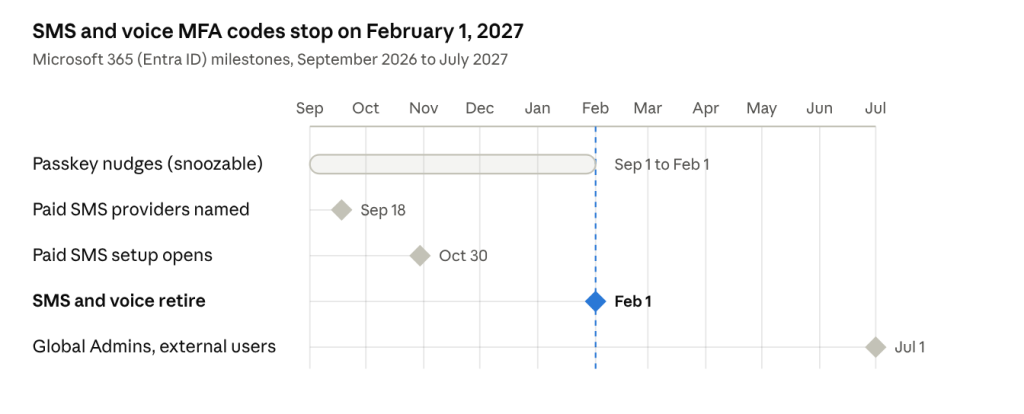
MFA Microsoft 2027 stats

SMS and voice MFA retirement timeline · 5 milestonesUntil February 1, staff can keep snoozing the passkey prompt. After that date, setup is mandatory.

Date What happens What it means for you
September 1, 2026 Passkeys switched on for every user enabled for SMS or voice. Users are nudged to register a passkey at sign-in. Already happening. Staff can snooze the prompt for now, so many will ignore it.
September 18, 2026 Microsoft named the telecom providers that can keep SMS and voice alive for a fee. You can now price out paid SMS if you truly need it.
October 30, 2026 Setup of a third-party telecom provider opens in Microsoft Security Store. The earliest date you can configure paid SMS or voice.
End of 2026 Passkey support arrives for guest and B2B users. Plan for vendors and partners who sign in to your tenant.
February 1, 2027 Microsoft-provided SMS and voice retire for most users. Anyone whose only method is SMS or voice must register a passkey before signing in. The deadline. The snooze button disappears.
July 1, 2027 Same retirement for Global Administrators and external users. Your admin accounts need a stronger method too.

This schedule applies to Microsoft's commercial (public) cloud. Government cloud tenants will follow a later schedule.

Why is Microsoft retiring SMS and voice MFA?

Text and phone codes are now among the easiest MFA methods for criminals to beat. Microsoft calls SMS and voice some of the most vulnerable authentication methods available today (Microsoft Learn).Three attacks do most of the damage:SIM swapping. A scammer talks your mobile carrier into moving your number to their phone. Your codes now go to them.Phishing for the code. A fake Microsoft login page asks for your password, then asks for the texted code. The attacker types both into the real site in seconds.AI-powered social engineering. Microsoft's 2025 Digital Defense Report found AI-written phishing emails got a 54% click-through rate, versus 12% for human-written ones (The Register).A passkey stops all three. It is tied to your device and only works on the real Microsoft website, so there is no code to forward and nothing a fake login page can capture.

Is your business affected?

You are affected if even one person in your Microsoft 365 tenant is enabled for SMS or voice sign-in. That includes users switched on in older "per-user MFA" settings, which many small businesses still have running in the background.

Personal Microsoft accounts, like Outlook.com, are moving toward passkeys too, but this deadline is for business accounts.

What happens if you do nothing?

A flood of "I can't log in" calls on the first business day of February. Employees without a smartphone, or with an old one, stuck until IT steps in. Staff mistaking the new prompt for a phishing scam, because nobody warned them. Shared mailboxes and front-desk accounts that relied on one person's cell number suddenly unreachable.

  • A flood of "I can't log in" calls on the first business day of February.
  • Employees without a smartphone, or with an old one, stuck until IT steps in.
  • Staff mistaking the new prompt for a phishing scam, because nobody warned them.
  • Shared mailboxes and front-desk accounts that relied on one person's cell number suddenly unreachable.

Every one of these is avoidable with a few weeks of planning.

How to prepare: 5 steps before February 1, 2027

  1. Find everyone still using SMS or voice. In the Microsoft Entra admin center, go to Authentication methods, then Monitoring, then User registration details. Filter for phone methods. Microsoft also publishes a free PowerShell usage analyzer ; any result above zero means you are in scope.
  2. Check the legacy MFA settings too. Users switched on in the old per-user MFA page count, even if your newer policies look clean.
  3. Pick the replacement methods. For most offices, that means passkeys in Microsoft Authenticator for staff with smartphones, Windows Hello on company laptops, and FIDO2 security keys for shop-floor, shared-device or no-phone users.
  4. Tell your team before Microsoft does. Send a short note explaining the new prompt is real, why it matters, and the date it becomes mandatory. Set up a time for anyone who needs help.
  5. Clean up after the move. Once people have a stronger method, turn SMS and voice off in your Authentication Methods policy, cover your Global Admin accounts before July 1, 2027, and test password reset.

Can you keep SMS MFA after February 2027?

Yes, but it will cost money and you stay on the weaker method. Microsoft now lets businesses contract a telecom provider through Microsoft Security Store, starting with Soprano and Telesign, with setup opening October 30, 2026. Pricing depends on the provider, region and usage (Microsoft Learn).

That route makes sense only with a real business, regulatory or technical need, such as staff who cannot carry a smartphone. Moving users to passkeys costs nothing extra. For most Northeast Wisconsin businesses, passkeys are the cheaper and safer answer.

How Focus Systems can help

Focus Systems manages and secures Microsoft 365 for businesses across Appleton, Green Bay, Oshkosh and the Fox Valley. We can take this deadline off your plate:

  • Audit your tenant and list every user still on SMS or voice.
  • Find hidden legacy MFA settings and admin accounts that need attention.
  • Roll out passkeys, Microsoft Authenticator, Windows Hello or security keys, in person when needed.
  • Write the staff announcement and run hands-on setup sessions.
  • Shut off SMS and voice cleanly once everyone has moved.

Not sure where you stand? Claim your free IT Health Check and we will show you exactly who in your organization still depends on text message MFA. Prefer to talk? Call us at 920-870-0002.

Frequently asked questions

When does Microsoft stop SMS and voice MFA?

Microsoft-provided SMS and voice MFA retire on February 1, 2027, for most Microsoft 365 business users. Global Administrators and external users follow on July 1, 2027.

Is Microsoft getting rid of MFA?

No. Microsoft is removing only text message and phone call codes. MFA remains required, and passkeys become the default method.

Will my employees be locked out on February 1, 2027?

Not permanently. Anyone whose only method is SMS or voice will see a mandatory passkey setup screen and must finish it before signing in.

What is a passkey?

A passkey is a sign-in credential stored on your phone, computer or security key, unlocked with your face, fingerprint or PIN. It cannot be phished because it only works on the real website.

Does the Microsoft Authenticator app still work?

Yes. Authenticator push notifications and codes are not affected, and the app can also store your passkey.

Does this affect password resets?

Yes. SMS and voice also retire for Microsoft's self-service password reset, so users need another verification method.

Can we keep using text message codes?

Only by paying a third-party telecom provider through Microsoft Security Store. Setup opens October 30, 2026.

What should a small business do first?

Run a report of who still uses SMS or voice. You cannot plan the move until you know who is affected.

Sources